What a Weathergami Plot Reveals About Daily Temperature
Daily weather archives usually arrive as long tables of numbers. Those tables are essential for analysis, but they are not always the fastest way to understand the thermal character of a station.
This is where a Weathergami plot becomes surprisingly powerful. By placing daily maximum temperature on one axis and daily minimum temperature on the other, it compresses years of daily observations into a single climate signature.
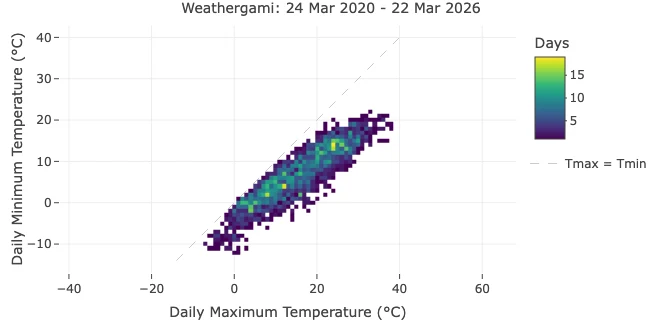
In this article, we use the Berlin-Tempelhof example shown above, covering 24 Mar 2020 to 22 Mar 2026, to explain what this plot reveals and why it is such a useful way to read daily temperature data.
If you want to inspect the same station and period directly in Climate Explorer, open the Berlin-Tempelhof daily view.
What the Axes Mean
The horizontal axis shows the daily maximum temperature. The vertical axis shows the daily minimum temperature.
Each day in the record contributes one point to the plot. A cool winter day might land near 3°C maximum and -2°C minimum, while a warm summer day might land near 27°C maximum and 16°C minimum. When many days fall into the same temperature bin, the plot becomes brighter in that area.
This makes the plot a compact summary of how often a station experiences cold days, mild days, hot days, and large or small day-night temperature ranges. Rather than reading temperature one day at a time, you begin to see the full structure of the station’s daily climate.
Why the Diagonal Matters
The dashed diagonal marks the line where Tmax = Tmin.
In reality, daily maximum temperature must be equal to or higher than daily minimum temperature, so all valid observations should sit on or below the diagonal. The distance from that line is important because it represents the size of the daily temperature range.
- Cells close to the diagonal indicate days when temperatures changed little between night and afternoon.
- Cells farther below the diagonal indicate days with a larger day-night contrast.
This is one reason the plot is so useful. It shows not only whether a place is warm or cold, but also whether its days are thermally stable or highly variable.
Reading the Berlin-Tempelhof Example
Berlin’s pattern forms a narrow but clearly seasonal band stretching from the lower-left toward the upper-right of the chart.
That shape tells us several things immediately:
- The station has a strong seasonal cycle. Winter days cluster around low maximum and minimum temperatures, while summer days shift toward much warmer combinations.
- Most daily combinations are concentrated in a middle corridor. Berlin spends more time in cool-to-mild conditions than at the thermal extremes.
- Very hot or very cold combinations are rare. The outer edges of the plot are much darker, indicating unusual days rather than the thermal norm.
- The daily range is moderate rather than extreme. Most cells remain a modest distance below the diagonal, which fits a temperate mid-latitude climate.
In other words, the graphic acts like a fingerprint of local temperature behavior.
Why This Is More Informative Than a Simple Average
Average temperature is useful, but it hides structure.
Two locations can share the same annual mean temperature while having very different combinations of daytime warmth and nighttime cooling. One place may have frequent hot afternoons and cool nights. Another may have milder afternoons but warmer nights. A Weathergami plot separates those patterns visually.
That makes it particularly valuable for:
- comparing seasonal temperature structure
- spotting unusual high-low combinations
- identifying stations with large diurnal ranges
- explaining climate behavior to non-specialists
That is why the chart works so well both for climate analysis and for communication. It is quantitative, but it is also immediately readable.
Why Record Length Still Matters
This Berlin example already works well because it covers several years of daily data. That is long enough to reveal a stable shape rather than a one-season curiosity.
Still, record length affects interpretation:
- a short record highlights recent weather
- a longer record better represents climate
- unequal record lengths make cross-city comparisons harder, especially when color shows absolute day counts
That is why this article focuses on a single worked example instead of comparing many stations directly. The plot remains highly informative, but it avoids overstating differences that may partly reflect unequal time coverage.
This Idea Extends Beyond One Dataset
Although the example shown here comes from Berlin-Tempelhof, the same logic applies anywhere Climate Explorer provides daily Tmax and Tmin values.
That means Weathergami-style views can also be generated for other supported datasets and station networks, not only this one example. The key requirement is simple: a daily record with both maximum and minimum temperature. Once those variables exist, the plot becomes a compact way to describe the thermal signature of a station.
What changes from dataset to dataset is not the meaning of the plot, but the length of record, station coverage, and climatic context behind it. The visualization stays the same; the interpretation depends on the data behind it.
Conclusion
A Weathergami plot is more than a clever graphic. It compresses years of daily temperature observations into an immediately readable climate signature.
Using Berlin-Tempelhof as an example, we can see how daily maximum and minimum temperatures combine into a recognizable seasonal structure, how the diagonal encodes the day-night range, and how rare events stand out naturally at the fringes of the distribution.
For anyone exploring historical daily weather data in Climate Explorer, this is one of the most efficient ways to move from raw values to climate intuition.
Frequently Asked Questions (FAQ)
What is a Weathergami plot?
A Weathergami plot is a heatmap of daily maximum temperature versus daily minimum temperature. Each cell shows how often a particular high-low temperature combination occurred.
Why is the diagonal line important?
The diagonal marks where daily maximum equals daily minimum. Since the maximum cannot be lower than the minimum, valid observations stay on or below this line. The distance below it reflects the daily temperature range.
Does a Weathergami plot require a long time series?
Not strictly, but longer records produce more stable and representative patterns. Short periods can still be useful, though they describe recent weather more than long-term climate.
Can this plot be made for other Climate Explorer datasets?
Yes. Any dataset section that includes daily maximum and minimum temperature can support the same type of plot.