DWD Rainfall: What a Daily Total Leaves Out
At Großenkneten in Lower Saxony, the 144 ten-minute rainfall records dated 23 February 2026 add up to 8.74 mm. That total tells us how much precipitation appears in those records. It leaves out the bursts and pauses along the way.
The largest value, 1.29 mm, carries the timestamp 17:20 UTC. The next record contains another 1.11 mm. Looking within the day reveals a short concentration of rainfall that a single total would hide. These are observations from DWD station 00044, not a measure of conditions across Lower Saxony.
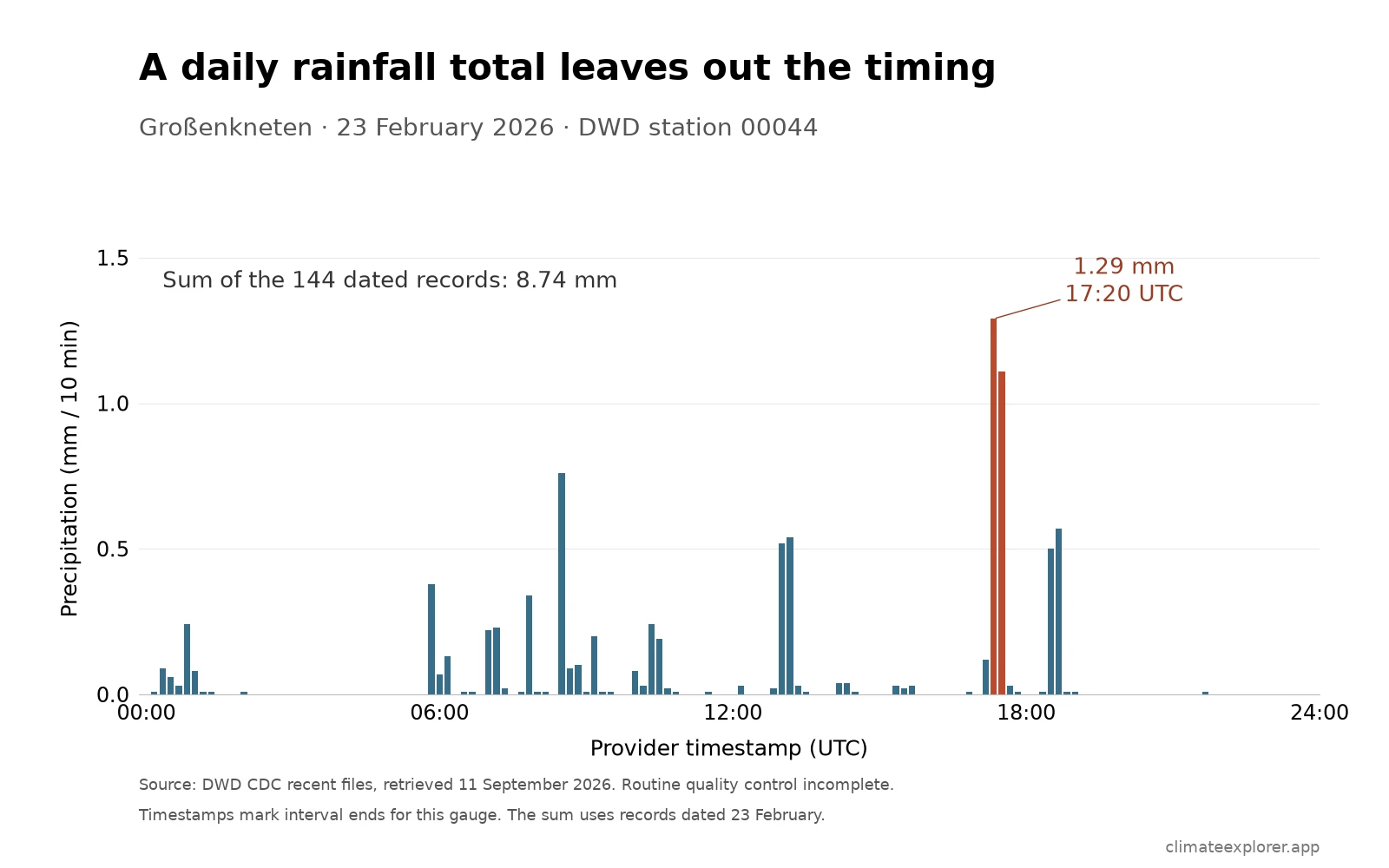
Daily values preserve magnitude but lose sequence
A daily product can retain the highest and lowest temperature or total precipitation while discarding the order of shorter changes. Two days can therefore have similar daily summaries but very different within-day patterns.
| Question | Daily summary can answer | 10-minute series adds |
|---|---|---|
| How warm or cold was the day? | Daily maximum and minimum, where available | The times and sequence of shorter temperature changes |
| How much precipitation was reported? | Daily total, where available | The reported interval and size of shorter accumulations |
| Did conditions change rapidly? | Only indirectly from daily values | The order and approximate timing of observations within the day |
At its nominal interval, a complete 10-minute series contains six observations per hour. Actual coverage depends on the station, product, and missing intervals. DWD’s 10-minute products can include temperature, precipitation, wind, humidity, pressure, sunshine, or radiation, but no single station is guaranteed to report every variable.
A timestamp is part of the measurement
DWD defines RWS_10, the precipitation field used here, as the amount over the previous ten minutes. Its station metadata identifies a rain[e]H3 gauge at Großenkneten during this period. For that instrument, DWD says the timestamp marks the interval’s end: the value labelled 17:20 UTC covers the preceding ten minutes.
That convention should not be assumed for every gauge. DWD documents a response delay for another instrument type. Checking the station’s equipment history is part of interpreting a short interval correctly.
Temperature has a different definition. DWD’s TT_10 field is an instantaneous air-temperature reading two metres above the ground. A record every ten minutes does not make it a ten-minute average, or guarantee that it captures the highest temperature between readings.
The distinction matters when combining products: check the variable, interval and timestamp convention before lining up a rain bar with a temperature change.
The wider extract puts the example in context
The reviewed extract covers 30 January through 28 February 2026. Within that fixed window:
- the lowest sampled air temperature was −8.8°C (16.2°F) at 02:30 UTC on 15 February;
- the highest was 18.6°C (65.5°F) at 14:40 UTC on 27 February;
- the largest ten-minute precipitation value was the 1.29 mm record labelled 17:20 UTC on 23 February; and
- both fields contained 4,320 non-missing values, covering every expected timestamp in the extract.
The lowest and highest temperatures occurred twelve days apart. They describe the range across the extract, not a single rapid warming episode or an official temperature record.
What the observations do not prove
The series describes measurements at one station. It does not by itself show that the same sequence occurred across northwest Germany, identify a meteorological cause, or establish impacts such as icing or flooding. Those claims would require additional stations, synoptic evidence, and impact records.
Recent DWD files can also have incomplete routine quality control. Station metadata, instrument history, timestamps, units, and provider quality fields should remain attached to any formal analysis. DWD remains the authoritative source when values or revisions matter.
Reproduce the view or inspect the source
Use the German Weather Station Explorer for broad station discovery. To recreate a comparable view, follow the DWD station-data guide: choose 10 Minutes, find Großenkneten (00044), select an available date range, and open Dashboard → Plots. The live recent-data window may no longer include this fixed February example.
The Dashboard’s Export Excel control downloads the current processed selection as an .xlsx workbook. Climate Explorer is an independent interface and is not affiliated with DWD. For the calculation shown here, use the dated-record CSV, or retrieve the provider ZIP products linked below. The CSV preserves two decimal places from the source, so rounding each interval does not change the sum.
Conclusion
The 8.74 mm sum gives one number for the dated records. The ten-minute series shows how that amount was distributed, including two larger values in quick succession in the late afternoon. That is the useful extra detail. To interpret it accurately, keep the provider’s timestamp and instrument conventions alongside the numbers.
Editor’s note: Data current as of February 28, 2026. The 30 January–28 February 2026 extract and precipitation interval calculations were rechecked against official DWD recent-product archives on September 11, 2026. Recent DWD products carry automatic quality control but remain subject to subsequent routine validation.
Data Annex
Updated 11 September 2026: Recalculated the 30 January–28 February 2026 extract from newly retrieved DWD recent-product ZIP files. The previously published temperature extremes are unchanged; the precipitation peak is now shown at source precision (1.29 mm, previously rounded to 1.3 mm). Added the single-day rainfall chart and clarified interval definitions.
The extract includes timestamps from 30 January at 00:00 through 28 February at 23:50 UTC. Provider missing-value code -999 and absent rows remain missing; no missing rain is replaced with zero. Neither analyzed field has missing values in this window. Both carry quality code QN=3 (automatic control and correction), but DWD still classifies the recent files as having incomplete routine quality control. The analysis uses these values without a further quality-code exclusion.
The 8.74 mm sum uses all 144 records whose timestamp date is 23 February. Because the labels mark interval ends, that selection begins with the interval ending at 00:00 and finishes with the one ending at 23:50. It does not realign the selection to a midnight-to-midnight day and should not be substituted for DWD’s separately defined daily precipitation product.
Station and dataset metadata
| Station | Provider station ID | Latitude | Longitude | Elevation | Resolution | Analysis period |
|---|---|---|---|---|---|---|
| Großenkneten | 00044 |
52.9336° N | 8.2370° E | 44 m | 10 minutes | 30 Jan–28 Feb 2026 |
Worked-example observation summary
| Metric | Value | Observation time (UTC) |
|---|---|---|
| Lowest sampled air temperature | −8.8°C (16.2°F) | 15 Feb 2026, 02:30 |
| Highest sampled air temperature | 18.6°C (65.5°F) | 27 Feb 2026, 14:40 |
| Largest ten-minute precipitation value | 1.29 mm | 23 Feb 2026, 17:20 |
| Sum of precipitation records dated 23 February | 8.74 mm | 144 provider timestamps |
| Non-missing values in each analyzed field | 4,320 | Full analysis period |
The provider station ID is the reproducible key used by DWD. No verified WIGOS mapping was needed for this worked example.
Data Sources
- DWD 10-minute air-temperature archive: Official Großenkneten temperature files.
- DWD 10-minute precipitation archive: Official Großenkneten precipitation files.
- Großenkneten recent temperature ZIP and recent precipitation ZIP: Rolling files used for the extract; their contents change with later updates.
- DWD precipitation product description: Field definitions, quality codes and instrument-dependent timestamp delays.
- Großenkneten precipitation metadata ZIP: Station position and instrument history, including the rain[e]H3 gauge used during the example period.
- DWD 10-minute air-temperature product description: Coverage, update groups, metadata, and quality status.
- DWD OpenData terms of use: Licence and attribution terms.